Which SQL Server Edition Do You Really Need?
Not every organization actually needs SQL Server Standard or Enterprise right away. Microsoft offers several editions, each with clearly defined boundaries.
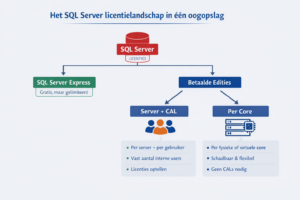
Take SQL Server Express, for example. It’s free and perfectly suitable for smaller environments, think lightweight applications, proof-of-concepts, or configuration databases. However, Express comes with strict limitations: a maximum of 10 GB per database, limited to 1 (v)core, restricted RAM and CPU usage, and no SQL Agent for scheduling.
As long as you stay within these limits, Express is a solid, cost-effective choice. But once you exceed them (and that often happens without anyone noticing) you’ll need to purchase licenses after all. In practice, we frequently see Express environments that have quietly outgrown their intended scope.
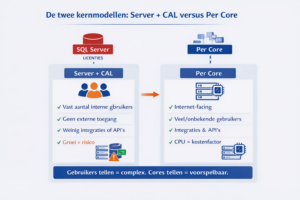
Server + CAL: predictable, but only with strict discipline
With the Server + CAL model, you license a SQL Server per server or instance, plus a Client Access License (CAL) for every user or device. This approach is cost-effective when you have a fixed and limited number of internal users, no external access, and relatively simple environments without complex integrations.
For example, an internal application used by 150 employees would require one server license and 150 User CALs. But this is also where the risk lies. Every user or device accessing the SQL Server needs a CAL. That includes service accounts, reporting tools, and middleware. As your environment grows, with external users, partners, or API integrations this model quickly becomes difficult to manage. For organizations with over 1,000 users accessing a website or portal, costs can escalate rapidly.
Per Core licensing: scalable, but with strict minimums
The Per Core model is now the most commonly used approach, especially in modern and virtualized environments. One often overlooked detail: a minimum of 4 core licenses per physical processor is required, regardless of the actual number of cores. For example, a server with 2 CPUs still requires at least 4 core licenses—even if those CPUs only have 2 cores each.
In physical environments, all physical cores must be licensed. In virtual environments, you license either the allocated vCores per VM or the entire host, depending on the scenario and edition. This model works well for internet-facing applications, environments with a large or unknown number of users, OLTP workloads, Always On configurations, and cloud or hybrid scenarios. The advantage: no CALs and no user tracking. The downside: as CPU capacity grows, so do licensing costs.
Software Assurance: cost center or strategic enabler?
Software Assurance (SA) is often seen as optional, but in practice it’s frequently essential. With active SA, you gain benefits such as upgrade and downgrade rights (useful during migrations), license mobility to shared hosts or authorized cloud providers, and failover rights for a single passive replica in HA/DR setups.
Without SA, licenses can typically only be reassigned once every 90 days, moving to the cloud is often restricted, and all replicas must be fully licensed. For organizations aiming for cloud adoption, consolidation, or Always On architectures, SA is less of a luxury and more of a prerequisite.
Always On and HA/DR: Technically Powerful, but Licensing Can Be Tricky
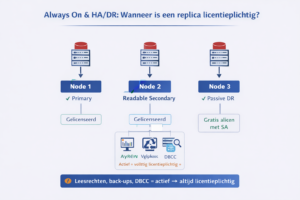
Always On is a powerful platform for high availability and disaster recovery but it’s also one of the biggest sources of licensing mistakes. The key rule: every SQL Server instance that performs active work must be licensed.
In practice, this means the primary replica must always be licensed, readable secondaries (used for reporting, backups, or DBCC) must also be licensed, and only one fully passive replica can run without an additional license and only if you have Software Assurance (SA).
Real-world example: a 3-node Always On setup
-
Node 1 is the primary → must be licensed
-
Node 2 is a readable secondary for reporting → must be licensed
-
Node 3 is dedicated DR, with no read access and no backups → can run without a license, but only with SA
No SA? Then all three nodes must be fully licensed.
Eight persistent myths about SQL Server licensing
SQL Server licensing is surrounded by persistent misconceptions. These rarely come from bad intent, but rather from a mismatch between technical logic and legal licensing rules. That’s why the same surprises keep surfacing during audits and migrations.
“Always On replicas are free”
Not true. Only one fully passive replica can run without an extra license and only with active Software Assurance. As soon as a replica is readable, used for backups, or supports reporting, Microsoft considers it production use and full licensing is required.
“Readable secondaries don’t require a license”
Incorrect. Readable secondaries are often used for reporting or workload offloading but that’s exactly what makes them licensable. In Microsoft terms, “readable” equals active usage.
“2 vCPUs = 2 cores, so 2 core licenses”
Not true. SQL Server licensing follows specific vCore-to-physical-core mapping rules and depends on host configuration. Virtualization abstracts the hardware, but licensing rules remain strict. This misunderstanding often leads to significant under-licensing.
“Service accounts don’t need CALs”
Incorrect. If a service account uses SQL Server functionality on behalf of users (via applications or middleware) CALs are typically still required. Microsoft licenses based on access, not whether usage is interactive.
“Only interactive users need CALs”
Not true. Any user or device accessing SQL Server (directly or indirectly) may require a CAL. This includes reporting tools, batch processes, and integrations.
“Reporting Services or Integration Services are always CAL-free”
Incorrect. Licensing depends on how these services are used and who accesses the data. If they provide data to users, CAL requirements may still apply.
“You can always move licenses to the cloud”
Not true. Moving SQL Server licenses to the cloud is only allowed with active Software Assurance and only to Microsoft-approved providers. Azure offers exceptions through Azure Hybrid Benefit, but “the cloud” is not a blanket exemption.
“Hyper-threading doubles the number of licenses”
Incorrect. Licensing is based on cores as defined by Microsoft. Hyper-threading improves performance but does not automatically increase the number of required licenses.
Why “quick calculations” are rarely accurate
SQL Server licensing costs are often underestimated, not because Microsoft is unclear, but because core counts are misinterpreted, virtualization effects are overlooked, Always On replicas are misjudged, and the implications of Software Assurance aren’t fully considered.
Online calculators can give you a rough estimate, but keep in mind that final licensing agreements and costs are always determined in consultation with a Microsoft licensing partner. Still, they can be useful as a starting point. Two helpful tools to get an initial estimate:
SQL Server Standard calculator and SQL Server Enterprise calculator.
Licensing as part of your architecture
SQL Server licensing isn’t separate from your technical design. Virtualization, Always On, cloud migrations, and hardware refresh cycles all have a direct impact on licensing. That’s exactly why it pays off to factor licensing into your architecture decisions upfront instead of trying to fix it afterward.
Enterprise vs. Standard: where are the real savings?
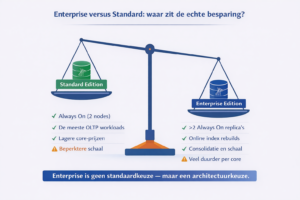
In practice, we often see SQL Server Enterprise being used “just to be safe,” while the actual workload would run perfectly fine on SQL Server Standard. Especially now that Standard Edition also supports Always On (up to two replicas), Enterprise is no longer a default requirement for high availability.
Many environments don’t actually use Enterprise-specific features such as online index rebuilds, advanced partitioning, or heavy in-memory workloads—but still pay for Enterprise core licenses. The cost difference adds up quickly, particularly in environments with many cores or multiple Always On replicas. On the flip side, when Enterprise is truly needed for scale, performance, or consolidation, making a deliberate edition choice can actually lead to more efficient licensing.
The takeaway is simple: Enterprise isn’t a default, it’s an architectural decision. And that’s often where the biggest structural savings can be found.
Want to be sure you’re on the right track?
At OptimaData, we help organizations take a holistic approach, covering everything from assessment and design to migration and optimization. Not by simply listing the rules, but by applying them to your specific environment and future plans.
Because one thing is certain: if you truly understand SQL Server licensing, you stay in control of both costs and risks. And if you don’t, you’ll almost always end up overpaying…sooner or later.
Get in touch and discover how we can assess and optimize your SQL Server environment.